
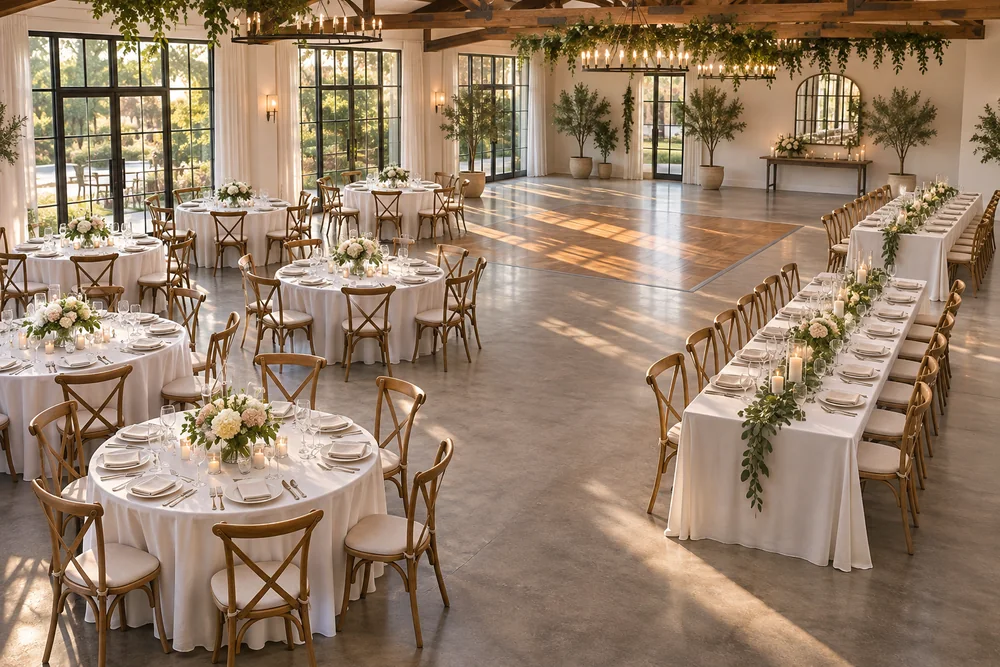
Round tables and long banquet tables can both work well at a reception. The useful question is which arrangement suits your room, guest groups and service. Try the alternatives in the table plan maker, then confirm the actual fit with your venue.
There is no reliable rule that one shape always holds more guests or always feels more sociable. Table dimensions, chair sizes, flowers and the spaces between tables all change the result. Start with the venue's real inventory rather than copying a photograph.
Compare the practical differences
| Decision | Round tables | Long or rectangular tables |
|---|---|---|
| Guest groups | Clear groups around separate tables | Groups can sit along one table or a sequence of tables |
| Table labels | Usually one name or number per table | Decide whether joined sections share one label |
| Seat assignments | Chairs are arranged around the perimeter | Decide how to use the two sides and any end seats |
| Room layout | Several separate clusters | Rows, parallel tables or another venue-approved arrangement |
| Service | Access between individual tables matters | Access along and between the rows matters |
In the planner, a rectangular table has chairs along its two long sides. The schematic is useful for comparing arrangements, but it does not calculate aisle widths or establish that a layout fits the room.
Start with the parts of the room that stay fixed
Mark the entrance, dance floor and stage before filling the plan with dining tables. Ask the venue where serving staff need access and which areas should remain clear. Then add the dining tables and move them around those fixed points.
For a mixed layout, keep the table names straightforward. A head table can have a name while the remaining tables use numbers. Guests and staff should be able to tell which label belongs to which physical table.
Build a round table seating plan
Add one round table, set the seat count confirmed by your venue and duplicate it. Move each table into its approximate position before assigning guests. The duplicated table starts without people, so copying a shape does not duplicate guest assignments.
Seat the groups that need the most attention first, then fill the remaining places. Check that the people nearest the dance floor or speakers are comfortable with that position. A visual plan makes these relationships easier to notice than a table-number column alone.
Build a long table seating plan
Add rectangular tables and rotate them to explore different orientations. If several physical tables form one continuous banquet table, agree with the venue whether it should have one table number or several clearly marked sections.
Keep that decision consistent in the guest list and stationery. For example, “Long Table A” on the plan should also appear as “Long Table A” on the escort cards. If exact chairs are assigned, preserve the seat numbers when transferring the list to the place card maker.
For the complete import and export process, follow how to make a table plan from your guest list.
Review more than the guest count
A plan can have enough chairs while still leaving confusing table labels or an awkward route through the room. Review the layout with your venue, check that every guest is assigned and ask which documents the coordinator needs.
Download the schematic PDF or PNG from the planner. For guests arriving at the reception, prepare a separate Find Your Seat poster or escort cards. Use table numbers to connect those entrance instructions to the physical tables; the numbering guide explains how to keep the labels consistent.
Keep the layout editable until printing
Save a backup before trying a substantially different arrangement. Use Undo for smaller experiments and keep the latest version in one place. When a guest changes tables, update the working plan and regenerate the cards before distributing the final files.
Compare your layouts in the table planner. Use a second backup file for an alternative version, rather than relying on separate browser tabs to keep independent plans.